
Chaos Engineering for Testers: Getting Started
TestlandMay 23, 2026Chaos engineering for QA engineers: define steady state, write a hypothesis, and run a fault-injection experiment with Playwright and Toxiproxy.
The staging environment never breaks the way prod does
A 200-test green suite tells you nothing about what happens at 2 a.m. when the payment service starts returning 503s and the retry logic finally trips a circuit breaker the tests have never exercised. Staging is too clean. The database isn't under real load, the third-party dependency hasn't drifted, and the network round-trip is a flat 2 ms instead of the 480 ms a mobile user actually sees. Tests pass. Production still falls over.
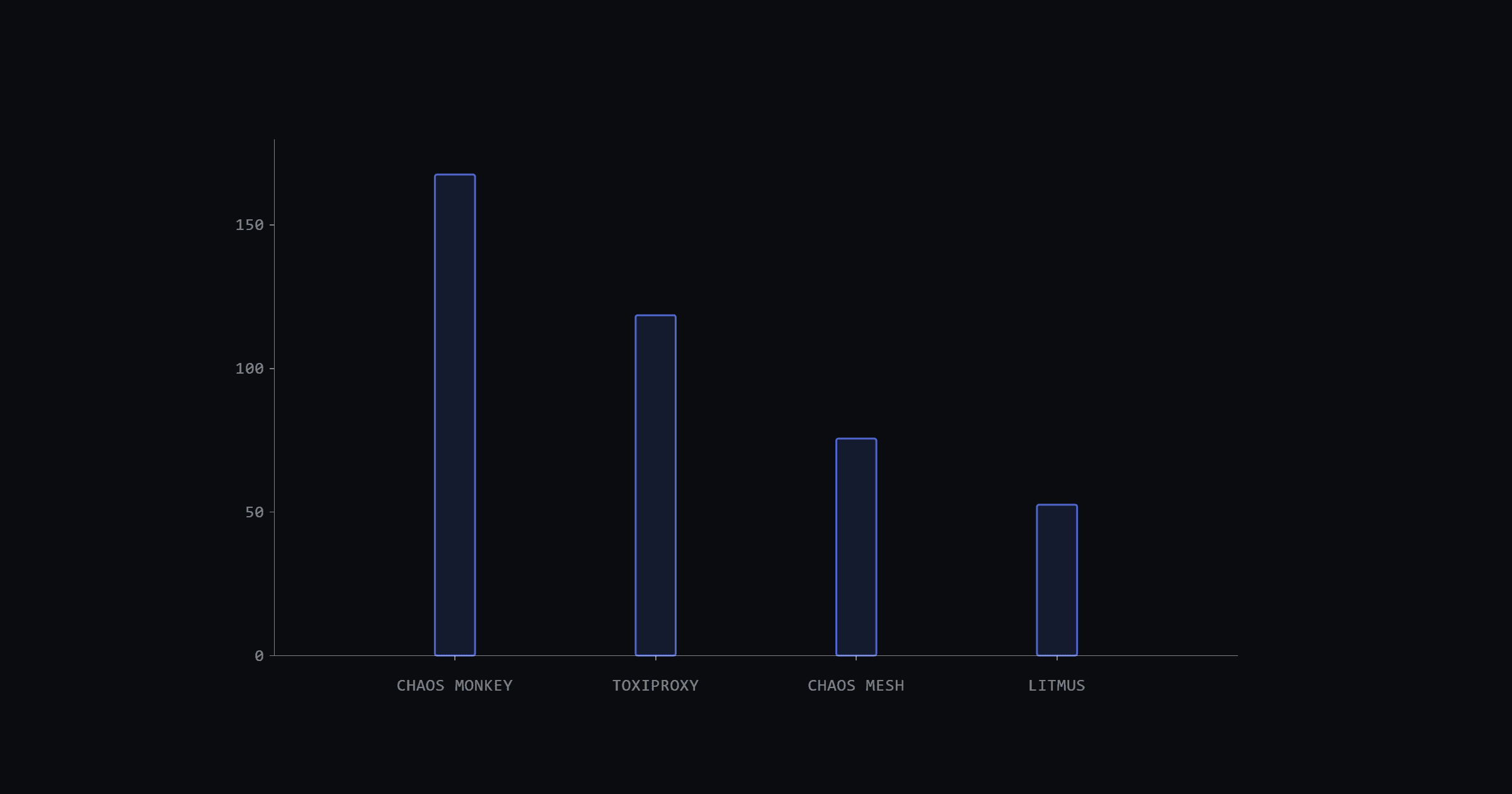
Chaos engineering closes that gap. The discipline started in 2011 when Netflix built Chaos Monkey during its migration to AWS to deliberately kill virtual machines and confirm the system kept serving traffic. The original repo sits at 16.9k stars as of January 2026, open-sourced under Apache 2.0 in 2012.
The practice scales. Shopify ran chaos game days before Black Friday Cyber Monday 2018, surviving roughly 100,000 requests per second and nearly 11,000 orders per minute at peak (as of December 2018). By the end of this post, you'll have a working chaos experiment running against a Playwright spec with Toxiproxy. One tester, one laptop.
What chaos engineering is (and what it isn't)
"Chaos Engineering is the discipline of experimenting on a system in order to build confidence in the system's capability to withstand turbulent conditions in production." That's the canonical definition, written by the original Netflix Chaos team (Casey Rosenthal, Lorin Hochstein, Aaron Blohowiak, Ali Basiri, and Nora Jones) and last revised in March 2019.
It isn't load testing. Load testing asks "how fast?". A chaos experiment asks whether the failure path actually works when one dependency degrades. It isn't negative testing either. Negative testing exercises bad inputs at the application layer (an empty string, a 12 MB upload, an emoji in a date field). Chaos engineering exercises bad infrastructure: a dropped TCP connection, 500 ms of added latency, a killed pod. And it isn't stress testing. Stress pushes one resource to its limit; chaos injects realistic infrastructure faults and asks whether user-visible behavior degrades gracefully.
Gremlin's chaos engineering page puts it this way: chaos engineering "goes beyond traditional (failure) testing in that it's not only about verifying assumptions. It helps us explore the unpredictable things that could happen, and discover new properties of our inherently chaotic systems."
Key facts about chaos engineering for testers
Five ideas every chaos experiment uses
Chaos engineering has five vocabulary words. None of them are new to a tester. They're the same things a test plan does, with different labels.
Steady state
Steady state is the measurable user-visible output that defines "the system is working." The principles document says: "Focus on the measurable output of a system, rather than internal attributes of the system." For checkout, that's "completes in under 5 seconds with HTTP 200 on order creation." Identical to a test assertion's expected condition. You've already written this a hundred times.
Hypothesis
A hypothesis predicts what happens when a fault hits. AWS publishes a template the rest of the industry borrows: "If [specific fault] occurs the [workload name] workload will [describe mitigating controls]." It's the "expected result" column of a test plan with the fault swapped in where the test step usually goes.
Blast radius
Blast radius is how much production the experiment can hurt. The principles call minimizing it "the responsibility and obligation of the Chaos Engineer". A tester already thinks this way about staging environments and isolated test data. Same instinct, higher stakes.
Control vs experimental group
Run the same scenario twice: once with the fault, once without. Compare the steady-state signal. If both groups complete checkout in 4.7 seconds, the system survived. If the experimental group stretches to 12 seconds, the hypothesis is disproved. A/B test thinking applied to infrastructure.
Game day
A game day is a scheduled, scripted, observed exercise. Camilo Lopez of Shopify defined it this way (December 2018): "Game days are a form of fault injection where we test our assumptions about the system by degrading its dependencies under controlled conditions." Slack runs the same idea as Disasterpiece Theater, started January 2018.
The 4-step chaos experiment loop
Every chaos experiment runs through the same four steps. The Netflix-originated principles document has stated them the same way since the canonical 2015 framing:
AWS expands the loop into a 5-step flywheel (Define, Hypothesize, Run, Verify, Improve), but it's the same shape with the "improve" step pulled out as its own beat. The rest of this post walks through these four steps for one tester-friendly scenario: 500 ms of latency injected on the payment service, with the existing checkout Playwright spec acting as both the assertion and the verifier.
Pick a user journey worth experimenting on
A chaos experiment is only useful if a real user would notice when it breaks. Pick a journey that already has a Playwright spec and a measurable success criterion: checkout, login, search, file upload, dashboard load. The right candidate for a first experiment touches multiple dependencies and has a hard time budget. Checkout fits both. It usually hits a cart service, a payment gateway, and an order service, and there's a number above which the user abandons the flow.
Shopify's resiliency matrix (Ryan McIlmoyl, December 2020) recommends documenting the expected user experience under each named failure scenario before running the experiment. That document becomes the source of truth: which dependency is broken, what should still work, what's allowed to degrade. For the walkthrough here, the output of this step is a Playwright spec file path plus one assertion that measures the steady-state signal.
// Playwright 1.40+
import { test, expect } from "@playwright/test";

test("checkout completes within 5s", async ({ page }) => {
  await page.goto("https://staging.example.com/cart");
  await page.getByRole("button", { name: "Place order" }).click();
  // Steady-state signal: the confirmation must be visible within the user's time budget.
  await expect(page.locator("#order-confirmation")).toBeVisible({ timeout: 5000 });
});
The #order-confirmation selector is illustrative. Substitute the actual confirmation locator from your app.
Define steady state in numbers, not vibes
Steady state is the assertion line in a Playwright spec. It's the number that has to hold true while the fault is active. The principles document is explicit: build the hypothesis around steady-state behavior, and focus on measurable output rather than internal attributes of the system. Throughput, error rates, latency percentiles. Things a user can feel.
A good steady-state signal has three properties: it's user-visible, it's easy to measure, and it has a budget. For checkout, that translates to a success rate at or above 99%, a p95 completion time at or below 5 seconds, and an HTTP 200 on POST /orders. Bad signals fail one of those tests. "CPU stays under 80%" is an internal attribute the user can't see. "No errors in logs" is too vague to falsify.
Ryan McIlmoyl framed the regression angle in Shopify's resiliency planning post (December 2020): "By executing the same experiments on a regular basis, we can spot any trends at easily handled traffic levels that might spiral into an outage at higher peaks." It's the same instinct that drives daily smoke runs. Repeat the experiment, watch the number drift, catch the regression before it becomes an incident.
// Playwright 1.40+
// The 5000 ms timeout is the steady-state budget the experiment will try to disprove.
await expect(page.locator("#order-confirmation")).toBeVisible({ timeout: 5000 });
Write the hypothesis as a single sentence
A hypothesis is a sentence that predicts a fault won't matter and gives the experiment a way to falsify itself. The AWS template is "If [fault] occurs, the [workload] will [behavior]." Applied to the checkout scenario, the sentence reads: "If 500 ms of latency is added to the payment service, the checkout flow still completes within 6 seconds and shows the order-confirmation page."
Richard Crowley gave a sharper real-world example in Slack's Disasterpiece Theater post (August 2019): "An example of this might be, 'Termination of a MySQL master will result in 20 seconds of increased latency...and less than 1,000 failed API requests.'" That sentence names a specific failure, a specific time bound, and a specific error budget. Three numbers the experiment can falsify.
Here's the point: a hypothesis without numbers can't fail. If it can't fail, it isn't a hypothesis. It's an opinion. The whole point of running the experiment is to find out whether the prediction is wrong. Skip the numbers and you've skipped the science.
Pick a fault-injection tool a tester can actually run
Most chaos tools assume the reader runs Kubernetes or a cloud account at a scale a single tester rarely has. Toxiproxy doesn't. It's a TCP proxy you can drop in front of any service, then ask (over HTTP) to add latency, drop connections, or limit bandwidth. Built by Shopify and in their dev and test environments since October 2014, 12k GitHub stars as of January 2026, with language clients for Go, Ruby, Python, Node.js, and .NET.
Here's how the main tester-facing options compare:
| Tool | Setup | Best for |
|---|---|---|
| Toxiproxy | Docker or a binary on laptop/staging (TCP proxy in front of any service) | First experiment, network faults |
| Gremlin (free tier) | SaaS, account + agent install on cloud hosts | Teams that want a UI and audit logs |
| Chaos Mesh | Kubernetes 1.19+ cluster, Helm | Cloud-native teams on K8s |
| AWS FIS | AWS account, IAM + CloudWatch alarms | Teams all-in on AWS |
| Azure Chaos Studio | Azure subscription | Teams all-in on Azure |
Toxiproxy wins the "first experiment" slot because it runs anywhere a tester can run Docker, the fault catalog covers the network-layer issues that already account for a large share of production incidents (timeouts, slow dependencies, dropped connections), and the HTTP API is easy to call from a Playwright hook. Once the team is comfortable, Gremlin provides an enterprise UI with safety controls; AWS FIS and Azure Chaos Studio are the right answer when the team lives in those clouds; and Chaos Mesh or LitmusChaos cover Kubernetes-native scenarios.
Run the experiment from a Playwright test
The experiment is a Playwright spec with two extra hooks: one that installs the fault before the test runs and one that removes it after. The spec itself doesn't change. The same await expect(...).toBeVisible({ timeout: 5000 }) line either holds (hypothesis confirmed) or fails (hypothesis disproved).
Add the latency toxic in beforeAll
A Playwright test.beforeAll hook calls Toxiproxy's HTTP API at http://localhost:8474/proxies/payment/toxics and adds a latency toxic with attributes: { latency: 500 } on the upstream stream. The proxy now sits between the test browser and the payment service, delaying every response by 500 ms. The existing checkout spec runs unchanged.
Before this hook runs, the payment proxy must already exist in Toxiproxy (created via toxiproxy-cli create -l 127.0.0.1:5051 -u 127.0.0.1:5050 payment or a POST /populate call at container start). The hook only installs the toxic; it does not create the proxy.
// Playwright 1.40+, Toxiproxy 2.x
import { test } from "@playwright/test";

const TOXIPROXY_API = "http://localhost:8474";

test.beforeAll(async () => {
  const response = await fetch(`${TOXIPROXY_API}/proxies/payment/toxics`, {
    method: "POST",
    headers: { "Content-Type": "application/json" },
    body: JSON.stringify({
      type: "latency",
      stream: "upstream",
      attributes: { latency: 500, jitter: 0 },
    }),
  });

  // Fail loud if the toxic didn't install. A silent failure here means the spec
  // runs against a clean service and the hypothesis passes for the wrong reason.
  if (!response.ok) {
    throw new Error(
      `Toxiproxy refused to add the latency toxic: ${response.status} ${await response.text()}`,
    );
  }
});
Remove the toxic in afterAll
A matching test.afterAll hook sends a DELETE to http://localhost:8474/proxies/payment/toxics/latency_upstream so the next test run gets a clean proxy. Skipping this is how teams end up with orphan faults that wreck the next 30 runs of the suite. If the Playwright assertion in the spec holds, the system survived 500 ms of payment-service latency. If it fails, that's the hypothesis being disproved, which is the experiment paying off.
// Playwright 1.40+, Toxiproxy 2.x
import { test } from "@playwright/test";

const TOXIPROXY_API = "http://localhost:8474";

test.afterAll(async () => {
  // Toxiproxy auto-names the toxic <type>_<stream> when "name" is omitted on POST,
  // so the latency toxic added upstream is reachable as "latency_upstream".
  const response = await fetch(
    `${TOXIPROXY_API}/proxies/payment/toxics/latency_upstream`,
    { method: "DELETE" },
  );

  if (!response.ok) {
    throw new Error(
      `Toxiproxy refused to remove latency_upstream: ${response.status} ${await response.text()}`,
    );
  }
});
Common pitfalls testers run into
Every team that adopts chaos engineering hits the same set of mistakes. Most of them are visible to a tester before the first experiment runs.
Frequently asked questions
Is chaos engineering just negative testing?
No. Negative testing exercises bad inputs at the application layer: an invalid email, a missing field, a SQL injection attempt. Chaos engineering exercises bad infrastructure: latency, dropped connections, killed processes. Same testing mindset, different layer of the stack, different fault catalog. The two practices complement each other.
Do you need to run experiments in production?
Not at the start. The principles document lists production as an advanced principle. Beginner teams run in staging until the experiment, the hypothesis, the steady-state signal, and the stop condition all work reliably. Gremlin's 2021 survey showed only 34% of respondents had reached production experiments (as of February 2021).
Can chaos experiments run in CI?
Yes. AWS recommends running chaos experiments "as regression tests in CI/CD." The Toxiproxy plus Playwright setup in this post fits any standard pipeline: install Toxiproxy as a service container, run the spec with the beforeAll hook adding the toxic, assert the steady state, tear down in afterAll. It catches resilience drift the same way a smoke test catches functional drift.
What's the difference between chaos engineering and a game day?
A game day is a scheduled, scripted, manually observed exercise. Shopify and Slack run them as formal events with named hosts, written runbooks, and a retrospective. Day-to-day chaos engineering is the automated CI version of the same experiment, running on every push. Same 4-step loop, different cadence.
Where chaos engineering for testers is heading
Chaos engineering moved from infrastructure-killing at Netflix in 2011 to user-journey verification at Shopify and Slack in January 2018. The next step is for it to live in QA pipelines alongside the existing end-to-end suite, version-controlled and reviewed alongside the assertions. As fault-injection libraries ship clients in 5+ languages (Toxiproxy already covers Go, Ruby, Python, Node.js, and .NET), experiment design moves into the test repo where testers already work.
A second trend: AI-assisted experiment design. Tools that generate hypothesis sentences from observability data are starting to appear, which shifts the tester's job toward validating the steady-state signal. On the platform side, both Chaos Mesh and LitmusChaos are incubating in the CNCF, with no graduated chaos project yet (as of January 2026).
Start small. Install Toxiproxy locally, point it at one staging service, and add a beforeAll hook to one Playwright spec. The Toxiproxy install guide is at https://github.com/Shopify/toxiproxy#1-installing-toxiproxy. For the 4-step loop as a reference card, keep principlesofchaos.org open in a second tab.