
JUnit XML Format: Elements, Attributes and What Each Runner Writes
JUnit XML has no official spec. The elements and attributes readers expect, what junit-10.xsd requires, and what pytest, Playwright, Jest, Go and Maven write.
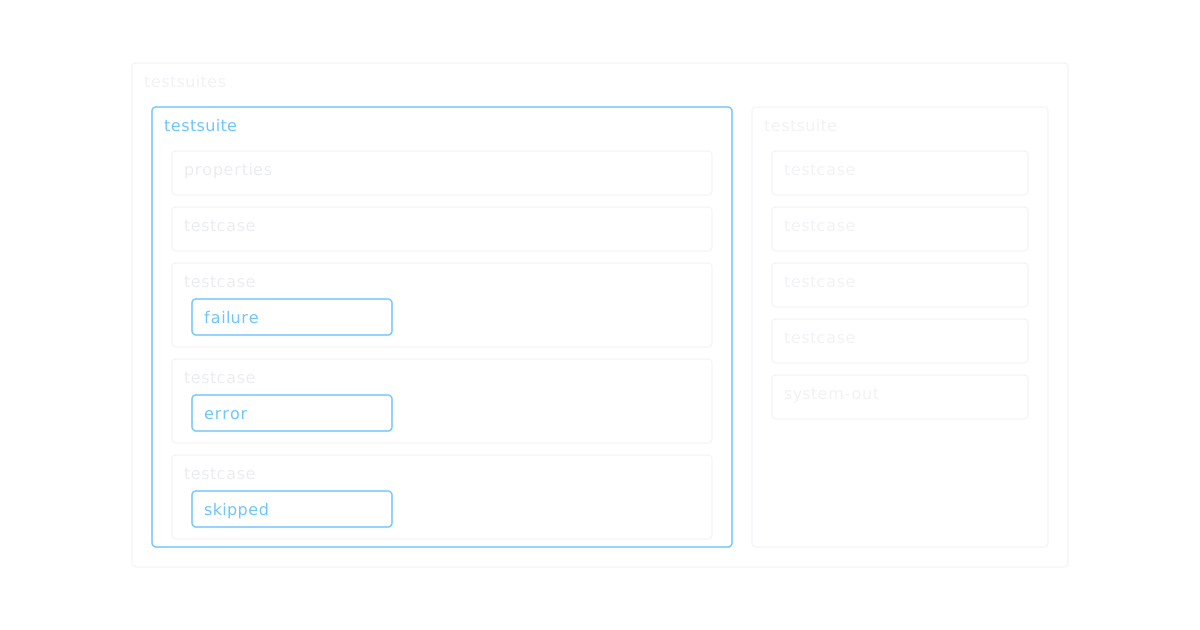
JUnit XML is the file CI systems read to show test results, but no standards body owns it. Each test runner writes its own dialect and each reader accepts its own subset, so the same run can show different numbers in two places. The closest thing to a reference is junit-10.xsd from the Jenkins xUnit plugin: pytest's default output targets it, and Maven Surefire publishes its own schema for the files it writes. This guide covers the element tree, the attributes each schema requires, and what pytest, Playwright, Jest, Go and Maven Surefire actually put in the file, checked against each tool's documentation or source as of November 2026.
The element tree
A trimmed file with one test of each outcome, reformatted for reading:
<?xml version="1.0" encoding="UTF-8"?>
<testsuites name="unit" tests="4" failures="1" errors="1" time="2.481">
<testsuite name="tests.test_cart" tests="4" failures="1" errors="1" skipped="1"
time="2.481" timestamp="2026-11-21T10:15:00+00:00" hostname="runner-7">
<properties>
<property name="python" value="3.13"/>
</properties>
<testcase classname="tests.test_cart" name="test_add_item" time="0.412"/>
<testcase classname="tests.test_cart" name="test_coupon" time="0.051">
<failure message="assert 12 == 10">Full traceback of the failed assertion</failure>
</testcase>
<testcase classname="tests.test_cart" name="test_checkout" time="2.018">
<error message="failed on setup with "ConnectionError"">Traceback of the setup error</error>
</testcase>
<testcase classname="tests.test_cart" name="test_gift_wrap" time="0.000">
<skipped message="gift wrap is off"/>
</testcase>
</testsuite>
</testsuites>The split between <failure> and <error> is a convention, and runners draw it in different places: pytest uses <error> for a failed setup or teardown, Playwright for a thrown exception such as a timeout. A dashboard or release gate that reads only failures misses every test counted under errors. Count both as failed.
What junit-10.xsd and the Surefire schema require
The Jenkins xUnit plugin's junit-10.xsd is the schema pytest names for its default xunit2 output. Its rules, element by element:
| Element | Required attributes | Optional attributes |
|---|---|---|
<testsuites> | none | name, tests, failures, errors, time |
<testsuite> | name, tests, failures, errors | skipped, time, timestamp, hostname, id, package, file, group, log, url, version |
<testcase> | name | classname, time, group |
<failure>, <error>, <skipped> | none | message, type |
<property> | name, value | none |
Three details in it explain most validation errors:
Maven Surefire's own surefire-test-report.xsd (version 3.0.2) is stricter in other places. Its only top-level element is <testsuite>, which must have name, tests, errors, skipped and failures and may have a flakes count. Every <testcase> needs name and time. Times are typed as numbers (xs:float), so the thousands separators that junit-10.xsd allows are invalid here, and <properties> only appears on the suite. It adds four retry elements, covered under Surefire below.
What each runner writes
pytest
pytest --junit-xml=report.xml writes the file (pytest docs). What lands in it, per the docs and the junitxml.py source of pytest 9.2.0:
The default junit_family has been xunit2 since pytest 6.1 (reference). Setting junit_family = xunit1 brings back file and line on each test case and keeps attributes added with record_xml_attribute, which xunit2 filters out. Under xunit2, record_property still writes its properties but warns that it needs xunit1.
Playwright
npx playwright test --reporter=junit prints the XML to stdout; set PLAYWRIGHT_JUNIT_OUTPUT_NAME=results.xml or reporter: [['junit', { outputFile: 'results.xml' }]] in the config to write a file (reporters docs). A file shaped like the reporter's output in Playwright 1.65.1, with example values:
<testsuites id="" name="" tests="3" failures="1" skipped="0" errors="1" time="9.8">
  <testsuite name="checkout.spec.ts" timestamp="2026-11-21T10:15:00.000Z" hostname="chromium"
             tests="3" failures="1" skipped="0" time="12.9" errors="1">
    <testcase name="checkout › pays by card" classname="checkout.spec.ts" time="4.1">
    </testcase>
    <testcase name="checkout › applies a coupon" classname="checkout.spec.ts" time="3.3">
      <failure message="expect(locator).toHaveText(expected) failed" type="expect.toHaveText">Error details</failure>
    </testcase>
    <testcase name="checkout › pays by invoice" classname="checkout.spec.ts" time="5.5">
      <error message="locator.click: Timeout 5000ms exceeded." type="TimeoutError">Error details</error>
    </testcase>
  </testsuite>
</testsuites>For a sharded run, merge the shards first and write one JUnit file from the merged result; the sharded reports guide shows the merge config.
Jest with jest-junit
Jest writes JUnit XML through the jest-junit reporter: npm install --save-dev jest-junit, then jest --ci --reporters=default --reporters=jest-junit writes junit.xml in the working directory (jest-junit README). Its defaults:
Setting JEST_JUNIT_CLASSNAME="{classname}" and JEST_JUNIT_TITLE="{title}" splits them into the describe path and the test title. JEST_JUNIT_ADD_FILE_ATTRIBUTE="true" adds a file attribute, which the README notes was validated on CircleCI and GitLab CI.
Go with gotestsum
For Go tests, gotestsum writes JUnit XML with gotestsum --junitfile unit-tests.xml. The testsuite name and the test case classname are the full package path by default. --junitfile-testsuite-name and --junitfile-testcase-classname take short (the package's own name), relative (the path from the repository root) or full, for readers that expect a shorter name.
Maven Surefire
Surefire runs in mvn test and writes one TEST-<class>.xml per test class into target/surefire-reports, each with a <testsuite> root. Run with retries, as in mvn -Dsurefire.rerunFailingTestsCount=2 test, it records them inside the test case (rerun docs):
<testcase name="retriesPayment" classname="com.example.PaymentTest" time="0.31">
<flakyFailure message="expected: <200> but was: <503>" type="org.opentest4j.AssertionFailedError">
<stackTrace>Stack trace of the first attempt</stackTrace>
</flakyFailure>
</testcase><flakyFailure> and <flakyError> mean a failed run followed by a pass. A test that never passes keeps its <failure> or <error> and gets a <rerunFailure> or <rerunError> for each further failing run. Readers that don't know these elements see the flaky test above as a plain pass.
Checking a file before CI reads it
Most broken JUnit files fail in the same few ways: suite counts that disagree with the test cases after a merge script or a crashed writer, times with a decimal comma, duplicate test names, and empty suites from a run that collected no tests. The JUnit XML validator checks for those with the line number of each, and the JUnit XML viewer shows the run as a table of failures, slow tests and suites. Both read the file in the browser and upload nothing.
When the numbers on a dashboard disagree with what the suite did, start with three questions: does the reader count errors as failures, does it read the counts from <testsuite> attributes or from the test cases, and does it understand the runner's retry elements. The JUnit XML analysis skill works through those questions on your own report files in Claude Code.