
Merge Sharded Playwright Reports in GitHub Actions, Then Balance the Shards
Merge blob reports from four GitHub Actions shards into one Playwright report, then use the merged timings to fix shards that Playwright splits by count.
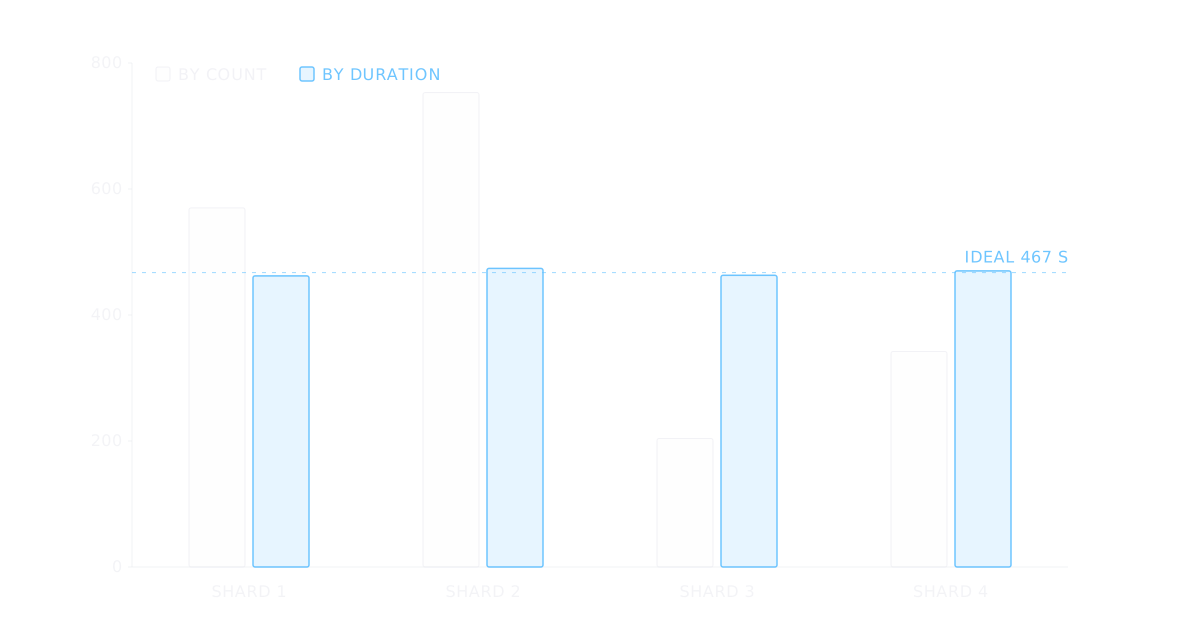
Sharding a Playwright suite across four GitHub Actions jobs leaves four separate reports, and a failure on shard 3 means opening shard 3's artifact to find it. The blob reporter and the merge-reports command fix that: each shard writes a blob file, and one more job merges them into a single HTML report. The merged run also answers a question the four separate reports can't. Playwright splits tests by count, not by time, so one shard often finishes minutes after the others, and the workflow waits for it. This guide builds the sharded workflow with current action versions, merges the reports, and then uses the merged timings to even out the shards. Commands and defaults are from the Playwright docs as of version 1.65.1, November 2026.
How Playwright decides what runs on each shard
npx playwright test --shard=1/4 runs the first of four shards. What lands on it depends on fullyParallel, per the sharding guide:
Both modes balance counts. Nothing in the split looks at how long a test took last time, so the shard that draws the checkout flow and the admin suite runs long while another finishes early.
An empty shard is not an error: it passes as long as the other shards found tests. Since Playwright 1.65, a sharded run where no shard finds a test fails with "No tests found" unless you pass --pass-with-no-tests.
A four-shard workflow that writes blob reports
Switch the reporter to blob on CI, so each shard writes a file that can be merged later:
// playwright.config.ts
import { defineConfig } from '@playwright/test';

export default defineConfig({
  testDir: './tests',
  reporter: process.env.CI ? 'blob' : 'html',
});The blob reporter writes into blob-report and, when sharding, names the file report-<hash>-<shard_number>.zip, so files from different shards don't collide in one folder. It deletes whatever is already in its output directory before writing. PLAYWRIGHT_BLOB_OUTPUT_DIR, PLAYWRIGHT_BLOB_OUTPUT_NAME and PLAYWRIGHT_BLOB_OUTPUT_FILE override the directory, the file name or the full path.
The test job follows the GitHub Actions example in the sharding guide, with each action on its current major version as of November 2026 (actions/checkout@v7, actions/setup-node@v7, actions/upload-artifact@v7; the guide still shows older ones):
# .github/workflows/playwright.yml
name: Playwright Tests
on:
  push:
    branches: [main]
  pull_request:
    branches: [main]
jobs:
  playwright-tests:
    runs-on: ubuntu-latest
    strategy:
      fail-fast: false
      matrix:
        shardIndex: [1, 2, 3, 4]
        shardTotal: [4]
    steps:
      - uses: actions/checkout@v7
      - uses: actions/setup-node@v7
        with:
          node-version: lts/*
      - run: npm ci
      - run: npx playwright install --with-deps
      - name: Run Playwright tests
        run: npx playwright test --shard=${{ matrix.shardIndex }}/${{ matrix.shardTotal }}
      - name: Upload blob report
        if: ${{ !cancelled() }}
        uses: actions/upload-artifact@v7
        with:
          name: blob-report-${{ matrix.shardIndex }}
          path: blob-report
retention-days: 1Three lines do most of the work:
Merging the blobs into one HTML report
A second job waits for every shard, downloads all the blobs into one folder and runs merge-reports:
  merge-reports:
    if: ${{ !cancelled() }}
    needs: [playwright-tests]
    runs-on: ubuntu-latest
    steps:
      - uses: actions/checkout@v7
      - uses: actions/setup-node@v7
        with:
          node-version: lts/*
      - run: npm ci
      - name: Download blob reports
        uses: actions/download-artifact@v8
        with:
          path: all-blob-reports
          pattern: blob-report-*
          merge-multiple: true
      - name: Merge into an HTML report
        run: npx playwright merge-reports --reporter html ./all-blob-reports
      - name: Upload HTML report
        uses: actions/upload-artifact@v7
        with:
          name: html-report--attempt-${{ github.run_attempt }}
          path: playwright-report
retention-days: 14needs makes the job wait for all four shards, and its own if: ${{ !cancelled() }} runs it even when some shards failed. In actions/download-artifact, pattern selects the four blob-report-* artifacts and merge-multiple: true extracts them into the same folder instead of one subfolder per artifact; the shard number in each file name keeps them apart. The job runs npm ci because merge-reports comes from the project's own @playwright/test, and like the guide's example it has no browser install step. The merged report lands in playwright-report, and the attempt number in the artifact name keeps a re-run's report next to the first attempt's instead of reusing its name.
Two more details from the merge-reports CLI section: --reporter takes a comma-separated list, such as --reporter=html,github, and reports merged from different operating systems need a merge config that says which directory is the tests root. In the HTML report, the Speedboard tab lists tests sorted by duration (Playwright 1.57), and for merged reports it also shows a timeline (1.58).
Getting JSON and JUnit from the same merge
The HTML report is for people. Tools need a file, and merge-reports can write it in the same step. The --config option takes a config with output reporters, which can differ from the one the shards ran with:
// merge.config.ts
export default {
  testDir: 'tests',
  reporter: [
    ['html', { open: 'never' }],
    ['json', { outputFile: 'results.json' }],
    ['junit', { outputFile: 'results.xml' }],
  ],
};Replace the merge and upload steps:
      - name: Merge into HTML, JSON and JUnit
        run: npx playwright merge-reports --config=merge.config.ts ./all-blob-reports
      - name: Upload reports
        uses: actions/upload-artifact@v7
        with:
          name: reports--attempt-${{ github.run_attempt }}
          path: |
            playwright-report
            results.json
            results.xml
retention-days: 14results.json holds every test with its file, outcome, retries and duration. results.xml is JUnit XML, the common exchange format for CI test results; Playwright writes one <testsuite> per test file and project.
Reading the merged report for shard balance
Load results.json into the Playwright JSON report viewer for the slowest tests, failures grouped by cause and flaky tests, or into the test shard balancer to see how the time splits across shards. Both pages read the file in the browser and upload nothing.
The balancer groups tests by file, which is what Playwright shards without fullyParallel, or keeps single tests, which matches fullyParallel: true. It then compares two plans for the shard count you choose: an equal-count split and a split by duration. Its built-in example is 14 spec files, 1,869 s in all, on four shards:
| Shard | Four files each, in name order | Balanced by duration |
|---|---|---|
| 1 | 570 s | 462 s |
| 2 | 753 s | 474 s |
| 3 | 204 s | 463 s |
| 4 | 342 s | 470 s |
The count split puts checkout.spec.ts (412 s) and cart.spec.ts (198 s) on one shard, which runs 753 s while shard 3 is done after 204 s. Balanced, the longest shard drops to 474 s, close to the 467 s that a perfect four-way split of 1,869 s would give. The equal-count column is not Playwright's exact assignment, which balances test counts rather than file counts, but it goes wrong for the same reason: it ignores time.
The balancer uses the longest-processing-time-first rule: sort the files from slowest to fastest, then give each one to the shard with the least time so far. R. L. Graham proved in 1969 that its longest shard is never more than 4/3 of the best possible one (doi:10.1137/0117039). It also flags a single file that takes longer than a fair share, because no split can beat that file: it has to be broken up.
Running duration-balanced shards with test lists
There are two ways to act on an uneven split.
Turn on fullyParallel. Splitting by test instead of by file gives the count-based split many more, smaller pieces to spread. By default, tests in one file run in order, so this only works for tests that don't depend on each other; the parallelism guide covers what to check first.
Give each shard its own test list. Since Playwright 1.56, --test-list <file> runs only the tests a file names, and a line with only a file path runs every test in that file. The balancer's Copy button gives one shard's files, one path per line, which is that format:
# shards/shard-1.txt
checkout.spec.ts
newsletter.spec.ts
404.spec.tsPaths are relative to the test root, the way npx playwright test --list prints them and the way the JSON report stores them. Point each matrix job at its list instead of --shard:
      - name: Run Playwright tests
        run: npx playwright test --test-list shards/shard-${{ matrix.shardIndex }}.txt
        env:
PLAYWRIGHT_BLOB_OUTPUT_NAME: report-${{ matrix.shardIndex }}.zipThe environment variable matters. The shard number in a blob's file name only appears when --shard is used, so without it, set a name per job; otherwise blobs from different jobs can share a name and overwrite each other when merge-multiple puts them in one folder.
A test list runs only what it names, so a spec file added after the lists were written is in no list and never runs. Add one more job that runs everything the lists leave out:
  unlisted-tests:
    runs-on: ubuntu-latest
    steps:
      - uses: actions/checkout@v7
      - uses: actions/setup-node@v7
        with:
          node-version: lts/*
      - run: npm ci
      - run: npx playwright install --with-deps
      - run: cat shards/shard-*.txt > all-listed.txt
- run: npx playwright test --test-list-invert all-listed.txt --pass-with-no-tests--test-list-invert skips every test in the file, so this job runs only tests that no shard list names, and --pass-with-no-tests keeps it green while there are none. To see its results in the merged report, give it the same blob upload step with its own artifact name, such as blob-report-unlisted, and its own PLAYWRIGHT_BLOB_OUTPUT_NAME, then add it to the merge job's needs. When it starts finding tests, regenerate the lists from a fresh merged report. Durations drift as the suite changes too, so the lists need the same refresh whenever the longest shard pulls away from the others again.
Where to start
Add the blob reporter and the merge job first: that alone replaces four reports with one, and it costs one extra job. Then take results.json from a full run on main, load it into the shard balancer, and switch to fullyParallel or test lists only if the longest shard runs well past the others. For the rest of the workflow, the GitHub Actions test automation guide covers the pull request setup and the Docker and workers guide covers worker counts per runner. The GitHub Actions test jobs skill applies the same matrix and report-upload patterns to a workflow in your own repository.