
Playwright Visual Tests That Pass in CI for the Right Reasons
Fix failing Playwright visual regression checks in CI: a four-step triage with tolerance last, and CI-generated baselines approved by named code owners.
Screenshot baselines recorded on a laptop tend to fail Playwright visual regression checks (toHaveScreenshot) in GitHub Actions. The two cheapest ways to turn that check green prove nothing: loosen the tolerance until the diff disappears, or let the author of the UI change re-record the baseline. A visual check earns its CI minutes only when it passes without hiding the change it exists to catch. That takes a fixed triage order (match the CI environment, stabilize the page, mask or scope volatile regions, set tolerance last) and one review rule: a CI job in the tests' container image generates new baselines, and a code owner who didn't write the change approves them.
Table of contents
This post assumes:
Why a laptop baseline fails in GitHub Actions
A baseline, the committed reference image toHaveScreenshot compares against, is only valid for the environment that rendered it. Playwright's snapshot docs warn: "Browser rendering can vary based on the host OS, version, settings, hardware, power source (battery vs. power adapter), headless mode, and other factors."
The default filename carries the platform: in example-test-1-chromium-darwin.png, chromium-darwin is "the browser name and the platform", and {platform} is "The value of process.platform." On a Linux runner, the failures to expect first are:
Read the diff in the Trace Viewer, then work four steps in order
Read the image diff first: with retries enabled and trace: 'on-first-retry', the HTML report's trace icon opens the Trace Viewer, where you can "compare screenshots by examining the image diff, the actual image and the expected image."
Steps 1 and 2 keep every region in the comparison; step 1 goes first because nothing else can be judged while the environment differs. Step 3 hides named regions that a reviewer can read in the spec. Step 4 hides small changes anywhere, including in the thing under test, with nothing in the diff showing where, so tolerance comes last. The order of steps 2 to 4 is this guide's.
These symptoms are heuristics, not Playwright error text.
| Step | Symptom | Fix |
|---|---|---|
| 1. Environment | Differences spread across the page, or a missing snapshot | Compare in the Playwright container image; generate baselines there |
| 2. Page | Assertion times out; the page keeps changing | Wait for the final state; stop motion and live data |
| 3. Mask or scope | One region differs: a date, an avatar, an ad slot | Mask it, or screenshot the component |
| 4. Tolerance | A few stray pixels remain after steps 1 to 3 | Set a pixel count on that assertion |
Step 1: run the test job in the Playwright container image
Run the test job in the Playwright container image (called the "CI image" from here on); the update job below uses the same one, so baselines are written and checked by one renderer. Laptop baselines won't match inside this image either, so regenerate them there (moving existing laptop baselines) before judging steps 2 to 4. The snapshot docs put it directly: "For consistent screenshots, run tests in the same environment where the baseline screenshots were generated."
The image tag must match the installed @playwright/test version, and the Docker guide covers why, along with the --init --ipc=host options that Playwright's Docker page recommends and its CI example omits. The report upload uses if: ${{ !cancelled() }}, so it runs even after a failed test step.
# .github/workflows/playwright.yml (verified against Playwright 1.64)
name: Playwright Tests
on:
  pull_request:
permissions:
  contents: read
jobs:
  playwright:
    runs-on: ubuntu-latest
    container:
      image: mcr.microsoft.com/playwright:v1.64.0-noble
      options: --init --ipc=host --user 1001
    steps:
      - uses: actions/checkout@v6
      - uses: actions/setup-node@v6
        with:
          node-version: lts/*
      - run: npm ci
      - run: npx playwright test
      - uses: actions/upload-artifact@v7
        if: ${{ !cancelled() }}
        with:
          name: playwright-report
          path: playwright-report/ # written by reporter: 'html'
retention-days: 30Step 2: stabilize the page until two screenshots match
A page that never holds still fails toHaveScreenshot with a timeout, not a pixel diff. The toHaveScreenshot reference says: "This function will wait until two consecutive page screenshots yield the same result, and then compare the last screenshot with the expectation." A screenshot counts as stable when two consecutive captures match.
Motion that never settles can't produce two identical captures before timeout runs out. caret defaults to "hide", and animations to "disabled", which "stops CSS animations, CSS transitions and Web Animations"; it names those three, so script-driven motion, video, and live data are the test's job: stop them at the source or wait for the final state. For timing failures that aren't pixel diffs, see the flaky-test guide.
Hover effects are captured too, so the snapshot docs move the mouse away before taking the screenshot:
await page.goto('/pricing');
await page.mouse.move(-1, -1);
await expect(page).toHaveScreenshot('pricing.png');Step 3: mask volatile regions and scope the screenshot
mask and stylePath should hide only volatile regions, never the thing under test. mask takes locators: "Specify locators that should be masked when the screenshot is taken." Per the assertion reference, masked elements are "overlaid with a pink box #FF00FF", so a difference under the overlay can't fail the check. Masking the price cell to silence a diff also silences a pricing regression.
A locator-level toHaveScreenshot captures one component instead of the page, so unrelated regions can't fail it. stylePath applies a custom stylesheet while the screenshot is taken; the snapshot docs say "This allows filtering out dynamic or volatile elements, hence improving the screenshot determinism."
import path from 'path'; // in an ESM project, use import.meta.dirname instead of __dirname

await expect(page).toHaveScreenshot('dashboard.png', {
  mask: [page.getByTestId('build-timestamp')],
});
await expect(page.getByRole('navigation')).toHaveScreenshot('nav.png');
await expect(page).toHaveScreenshot({ stylePath: path.join(__dirname, 'screenshot.css') });/* screenshot.css */
iframe { visibility: hidden; }Step 4: set tolerance last, sized against the default viewport
Tolerance goes last because it hides small changes anywhere on the page. threshold works per pixel: "An acceptable perceived color difference in the YIQ color space between the same pixel in compared images, between zero (strict) and one (lax)", with a default of 0.2. maxDiffPixels counts pixels allowed to differ and is "Unset by default." maxDiffPixelRatio sets that allowance as a fraction of all pixels, between 0 and 1.
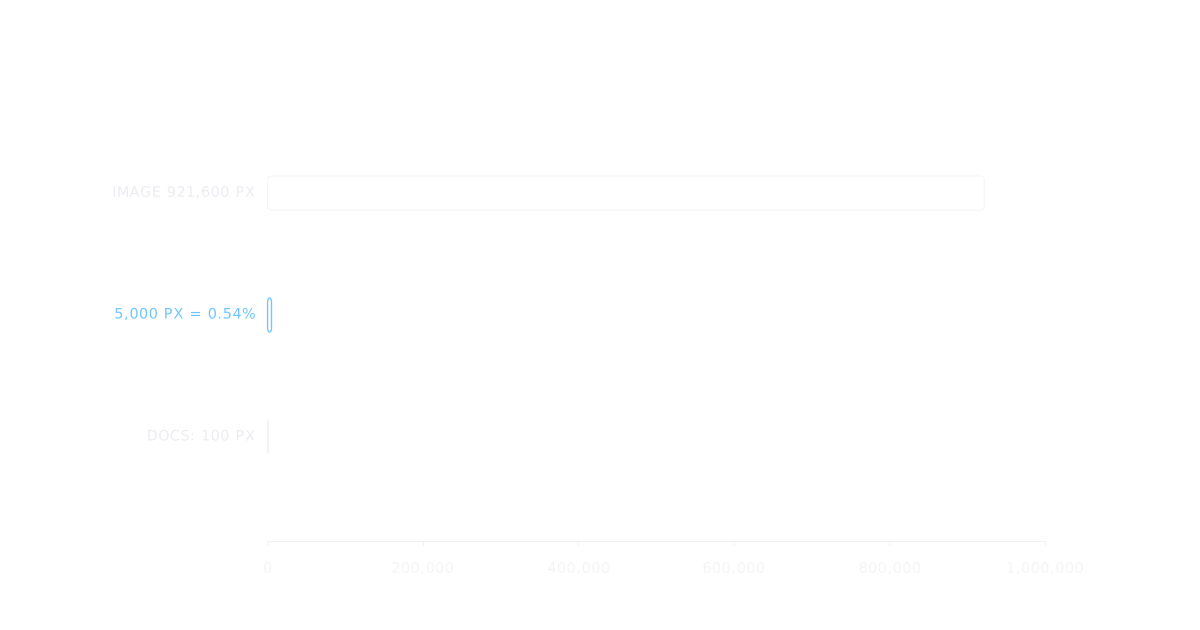
Size the allowance against the screenshot: the default viewport is 1280x720, so with the default scale ("css") and fullPage (false), 5,000 pixels is 0.54% of a 921,600-pixel image. A change touching fewer pixels than the allowance passes wherever it is, including in the thing under test. Measure the value from a diff you've looked at.
Set it per assertion, not suite-wide in expect.toHaveScreenshot: a suite-wide value loosens every screenshot from one config line, while a per-assertion value sits beside the one screenshot it excuses.
// 5,000 is illustrative; the docs' own example uses maxDiffPixels: 100.
await expect(page).toHaveScreenshot('report.png', { maxDiffPixels: 5000 });Updating baselines without approving your own diff
Baselines should come from a job in the CI image, approved by a code owner who isn't the author: the job fixes the environment, and the approval keeps authors from approving their own diffs. That takes two pull requests: a workflow_dispatch workflow runs only if its file is on the default branch, and code owners get review requests only when CODEOWNERS is on the base branch.
Pull request 1 adds the update workflow (it runs @visual specs, tagged in pull request 2), the CODEOWNERS line, and the "Require review from Code Owners" setting. The job never pushes, so it needs no write permission, and GITHUB_TOKEN pushes don't trigger push workflows.
# .github/workflows/update-visual-baselines.yml
name: Update visual baselines
on:
  workflow_dispatch:
permissions:
  contents: read
jobs:
  update:
    runs-on: ubuntu-latest
    container:
      image: mcr.microsoft.com/playwright:v1.64.0-noble
      options: --init --ipc=host --user 1001
    steps:
      - uses: actions/checkout@v6
      - uses: actions/setup-node@v6
        with:
          node-version: lts/*
      - run: npm ci
      - run: npx playwright test --grep @visual --update-snapshots=changed
      - uses: actions/upload-artifact@v7
        if: ${{ !cancelled() }}
        with:
          name: visual-baselines
          path: tests/__screenshots__/**/*.png
if-no-files-found: errorThe CODEOWNERS line works because "Pull request authors cannot approve their own pull requests." and "an approval from any of the owners is sufficient", so a team of two or more always has a non-author approver. Repository owners and administrators are the exception: they "can merge a pull request even if it hasn't received an approving review".
# .github/CODEOWNERS
/tests/__screenshots__/ @your-org/visual-reviewersIt covers only tests/__screenshots__/, which the next section's path template creates. Specs, playwright.config.ts, and the workflow sit outside it, so a raised tolerance is an ordinary code change. To protect the repository fully, "you also need to define an owner for the CODEOWNERS file itself." Solo repos keep the CI half but can't meet the approval half.
Moving existing laptop baselines into the CI image
Pull request 2 does the move:
// In each visual spec
test('pricing page', { tag: '@visual' }, async ({ page }) => {
  // ...
});// playwright.config.ts
import { defineConfig } from '@playwright/test';
export default defineConfig({
testDir: './tests',
expect: {
toHaveScreenshot: {
pathTemplate: '{testDir}/__screenshots__{/projectName}/{testFilePath}/{arg}{ext}',
},
},
});# Run from the repository root
gh workflow run update-visual-baselines.yml --ref my-branch
gh run list --workflow update-visual-baselines.yml --branch my-branch --limit 1
# Wait for the run to finish (gh run watch <run-id>), then download
gh run download <run-id> -n visual-baselines -D tests/__screenshots__
git statusUse changed, not all: since 1.50, all rewrites every snapshot, so older advice assumes a different meaning.
The owner opens each changed PNG and checks it against the change the pull request describes.
With one file per screenshot, a laptop re-record overwrites the Linux file in place, shows as a modified PNG in the owned folder, and normally fails CI. Never run --update-snapshots locally, and exclude the visual specs from laptop runs, where they would compare against Linux renders.
# Laptop runs skip the visual specs
npx playwright test --grep-invert "@visual"Every later UI change repeats the dispatch, download, and commit, then the owner's review, and a developer with a red check needs only the first three commands from the four-command block: dispatch, find the run ID, download.
Update modes and the screenshot option at a glance
Verified against Playwright 1.64; version notes inline.
| Mode or option | Behavior | Version note |
|---|---|---|
--update-snapshots=changed | Rewrites mismatches, creates missing | Added in 1.50; current docs say a bare --update-snapshots means this |
--update-snapshots=all | Rewrites every snapshot | Before 1.50: only failed or changed |
--update-snapshots=missing | Creates missing; those tests pass | Passing since 1.64 |
| No flag | Writes missing; those tests fail | Named 'default' in 1.64 |
use: { screenshot } | Screenshot after each test or failure; defaults to 'off' | Not a comparison |
Start with pull request 1: the update workflow, the CODEOWNERS line, and the Code Owners setting. To place visual specs in a wider suite, see how to organize regression testing for web apps; the Playwright topic page collects the rest.