
How to Set Up GitHub Actions for Test Automation
TestlandMay 29, 2026Set up GitHub Actions for test automation: triggers, dependency caching, browser matrix, sharding, and artifact upload, with a copy-ready Playwright workflow.
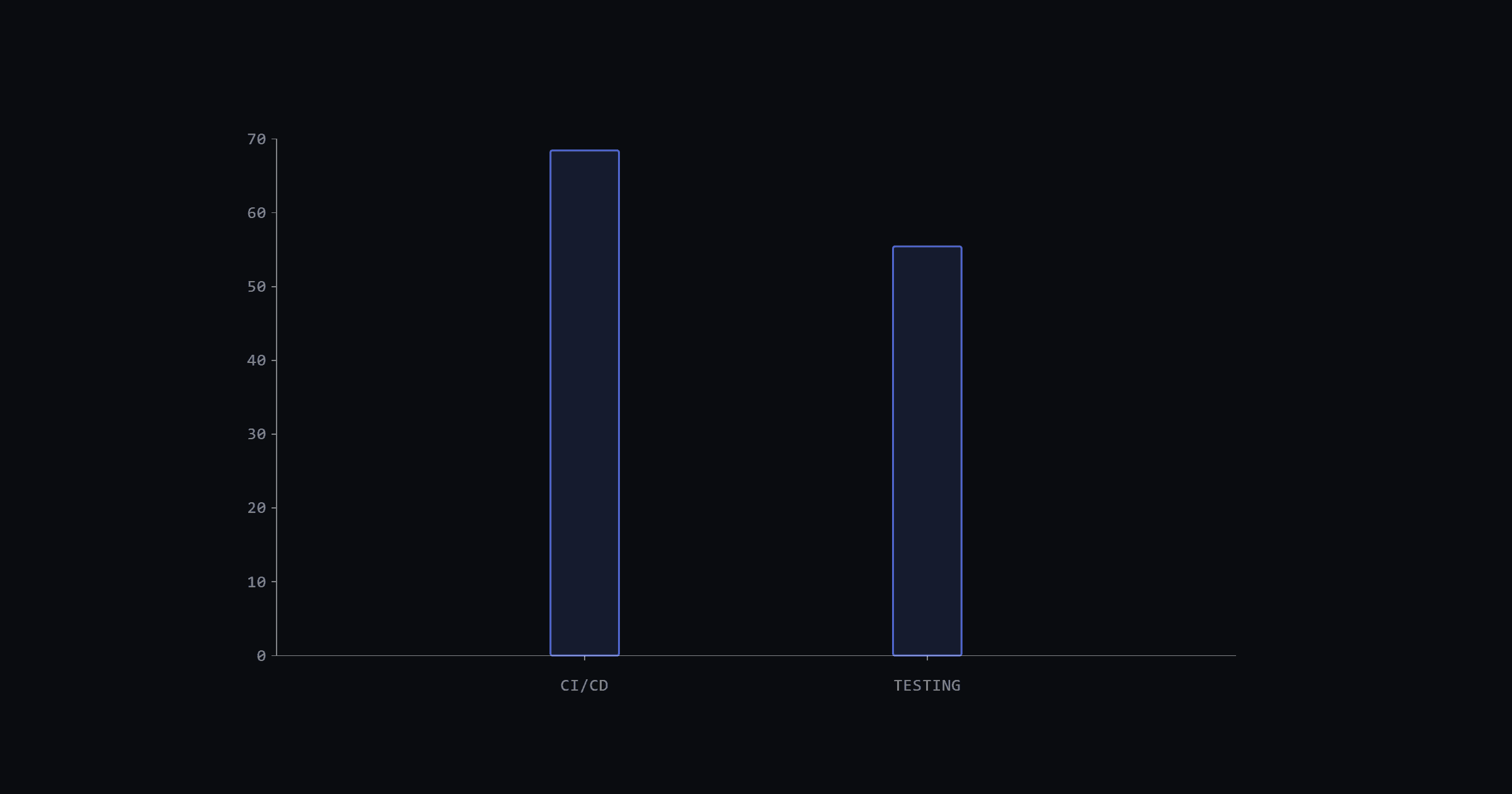
"Works on my machine" is a fine thing to say. Merging without green CI is not. Teams that skip wiring tests into their pipeline discover failures in staging or production. Martin Fowler put it directly: "The key to fixing problems quickly is finding them quickly." GitHub's 2025 Octoverse report counted 11.5 billion GitHub Actions minutes running tests last year, a 35% increase year-over-year. The 2024 Stack Overflow Developer Survey found 68.6% of professional developers have CI/CD available but only 56.3% report automated testing. This guide closes that gap: from a minimal .github/workflows/playwright.yml file to a sharded, browser-matrix Playwright workflow that gates every pull request.
GitHub Actions facts worth knowing before setup
A few numbers to have in mind before you touch YAML (as of May 2026):
Prerequisites
You need a repo with a Playwright test suite (see Playwright TypeScript setup if you're starting from scratch), Node.js 20+, and a package.json with a test script that maps to playwright test. No prior GitHub Actions experience required.
Step 1: the minimal workflow file
Create .github/workflows/playwright.yml. Everything else builds on this skeleton:
# .github/workflows/playwright.yml
name: Playwright Tests

on:
  workflow_dispatch: # manual trigger - useful for testing the workflow itself

jobs:
  test:
    runs-on: ubuntu-latest  # Ubuntu 24.04, 4-core/16GB RAM on public repos

    steps:
      - name: Checkout code
        uses: actions/checkout@v6
It does nothing yet, but it's a valid workflow that you can trigger manually from the Actions tab. Build from here rather than pasting a 60-line workflow and debugging everything at once.
Step 2: triggers that match how teams work
The on: block controls when the workflow runs. Most teams want four triggers:
on:
  push:
    branches: [main]          # run on every push to main
  pull_request:               # gate every PR - this is the one that stops broken merges
  workflow_dispatch:          # manual run from the Actions tab
  schedule:
    - cron: '0 2 * * *'       # nightly at 02:00 UTC - catches dependency drift

concurrency:
  group: ${{ github.workflow }}-${{ github.ref }}
  cancel-in-progress: true    # cancel the old run when a new commit is pushed to the same PR
The concurrency block is worth adding early. The workflow syntax docs define it as: "Use concurrency to ensure that only a single job or workflow using the same concurrency group will run at a time." Without it, pushing two commits quickly to a PR queues two full runs. The cancel-in-progress: true flag drops the older one the moment the newer run starts.
The pull_request trigger is what actually gates merges. Without it, a red test suite doesn't block anything: developers just click through the warning.
One practical note: this same trigger block works unchanged if you swap Playwright for pytest. The triggers are framework-agnostic.
Step 3: Node.js setup and dependency caching
Cold installs on every run add minutes. Cache them. These fragments go under the steps: key of your job; in the full file they sit two spaces deeper than shown here.
    - name: Set up Node.js
      uses: actions/setup-node@v6
      with:
        node-version: '20'
        cache: 'npm'           # caches ~/.npm, keyed on package-lock.json hash

    - name: Cache Playwright browsers
      id: playwright-cache
      uses: actions/cache@v5
      with:
        path: ~/.cache/ms-playwright
        key: ${{ runner.os }}-playwright-${{ hashFiles('package-lock.json') }}
        restore-keys: |
          ${{ runner.os }}-playwright-

    - name: Install dependencies
      run: npm ci

    - name: Install Playwright browsers
      if: steps.playwright-cache.outputs.cache-hit != 'true'
      run: npx playwright install   # binary download only; skipped on exact cache hit

    - name: Install Playwright system dependencies
      run: npx playwright install-deps   # apt packages aren't cached; always run this
Three things to get right here. First, the cache path for Playwright browsers is ~/.cache/ms-playwright, not node_modules: this is the most common cache-miss source. Include runner.os in the key because Linux, macOS, and Windows browser binaries are not interchangeable.
Second, the browser install and the system-dependency install are split into two steps on purpose. The browser binaries live in ~/.cache/ms-playwright and restore from cache, so npx playwright install can be skipped on a hit. The system libraries that WebKit and Firefox need (installed via apt) are not part of that cache path, and a fresh runner doesn't have them. Run npx playwright install-deps unconditionally; it takes seconds when the packages are already present. Skipping it on a cache hit is the classic "tests pass on Monday, WebKit crashes on Tuesday" failure.
Third, a precision note on cache-hit: it's 'true' only on an exact primary-key match. A restore-keys partial match restores the browsers but leaves cache-hit empty, so the install step re-runs. Safe, just not always faster.
The caching docs note two limits worth knowing: "By default, the limit is 10 GB per repository" and "GitHub will remove any cache entries that have not been accessed in over 7 days." Browser caches stay warm on active repos; on repos with infrequent pushes, expect a cold install every couple of weeks.
Step 4: running tests and uploading artifacts on failure
    - name: Run Playwright tests
      run: npx playwright test

    - name: Upload test results
      if: failure()            # only upload when tests fail - saves artifact storage
      uses: actions/upload-artifact@v7
      with:
        name: playwright-report
        path: test-results/
        retention-days: 30     # default is 90 days; 30 is plenty for a CI artifact
The if: failure() condition is the important decision here. Uploading artifacts on every run costs storage and creates noise. Upload on failure only, and set a sensible retention-days. The GitHub docs note: "By default, the artifacts and log files generated by workflows are retained for 90 days", and private repos can extend the period up to 400 days. Thirty days is enough for debugging a CI failure.
Without the artifact, a failing CI run is a mystery box. With the Playwright trace files in test-results/, you can download the zip, run npx playwright show-trace trace.zip, and replay every step the runner took: network requests, screenshots, console output included.
Step 5: a matrix across browsers
Single-browser CI is a reasonable start; it misses browser-specific rendering bugs. The strategy.matrix block multiplies a single job definition across browser configurations:
jobs:
  test:
    runs-on: ubuntu-latest
    strategy:
      matrix:
        browser: [chromium, firefox, webkit]
      fail-fast: false      # don't cancel chromium if webkit fails - you want all three results
      max-parallel: 3       # set lower on private repos to control minute consumption
    steps:
      # ... setup steps from above ...
      - name: Run Playwright tests
        run: npx playwright test --project=${{ matrix.browser }}
Two strategy flags matter here. Set fail-fast: false for E2E suites: if WebKit fails, you still want to see whether Firefox passed. With fail-fast: true (the default), a single failure cancels all in-progress jobs and you lose the other browser's signal.
For billing awareness on private repos: three parallel jobs each taking 5min is 15 minutes per PR run. At 100 PRs/month that's 1,500 of the 2,000 free minutes. The matrix docs note: "A matrix strategy lets you use variables in a single job definition to automatically create multiple job runs that are based on the combinations of the variables." The limits page adds: "A job matrix can generate a maximum of 256 jobs per workflow run."
For choosing between Playwright, Cypress, and Selenium in the first place, Playwright vs Cypress vs Selenium covers the trade-offs in detail.
Step 6: sharding for faster feedback
Browser matrix and sharding are different tools. Matrix runs the full suite on each browser in parallel. Sharding splits the test files within a single browser run across multiple workers, so a 400-test suite becomes four 100-test jobs running simultaneously:
    strategy:
      matrix:
        shard: ["1/4", "2/4", "3/4", "4/4"]

    steps:
      # ... setup steps ...
      - name: Run Playwright tests (shard)
        run: npx playwright test --shard=${{ matrix.shard }} --reporter=blob

      - name: Upload blob report
        uses: actions/upload-artifact@v7
        with:
          name: blob-report-${{ strategy.job-index }}
          path: blob-report/
After all shards finish, a separate merge job downloads the blob reports and runs npx playwright merge-reports to produce a single HTML report. The Playwright docs cover the merge pattern in detail.
One honest note on sharding: it pays off around 200+ tests. Below that, the setup overhead and artifact transfer add more time than parallelism saves. If your suite runs in under 3min on a single job, sharding makes your workflow more complex for no measurable gain.
The complete Playwright CI workflow
Here's the full workflow from steps 1 through 5, with inline comments marking each decision:
name: Playwright Tests

on:
  push:
    branches: [main]
  pull_request:
  workflow_dispatch:
  schedule:
    - cron: '0 2 * * *'      # nightly at 02:00 UTC

concurrency:
  group: ${{ github.workflow }}-${{ github.ref }}
  cancel-in-progress: true   # drops stale runs when a new commit arrives

jobs:
  test:
    runs-on: ubuntu-latest   # Ubuntu 24.04, 4-core/16GB RAM (free on public repos)
    timeout-minutes: 30      # job-level timeout; the runner hard limit is 6h per job

    strategy:
      matrix:
        browser: [chromium, firefox, webkit]
      fail-fast: false       # keep all browser results even when one fails
      max-parallel: 3

    steps:
      - name: Checkout code
        uses: actions/checkout@v6   # v6 as of May 2026; v4 is stale

      - name: Set up Node.js
        uses: actions/setup-node@v6
        with:
          node-version: '20'
          cache: 'npm'       # caches ~/.npm, keyed on package-lock.json

      - name: Cache Playwright browsers
        id: playwright-cache
        uses: actions/cache@v5
        with:
          path: ~/.cache/ms-playwright
          key: ${{ runner.os }}-playwright-${{ hashFiles('package-lock.json') }}
          restore-keys: |
            ${{ runner.os }}-playwright-

      - name: Install dependencies
        run: npm ci

      - name: Install Playwright browsers
        if: steps.playwright-cache.outputs.cache-hit != 'true'
        run: npx playwright install   # skip binary re-download on exact cache hit

      - name: Install Playwright system dependencies
        run: npx playwright install-deps   # system libs aren't cached; always run

      - name: Run Playwright tests
        run: npx playwright test --project=${{ matrix.browser }}

      - name: Upload test results on failure
        if: failure()
        uses: actions/upload-artifact@v7
        with:
          name: playwright-report-${{ matrix.browser }}
          path: test-results/
          retention-days: 30  # 90-day default is too long for CI debug artifacts
To add sharding on top of the browser matrix, replace the browser matrix with a combined browser + shard matrix and add --shard=${{ matrix.shard }} to the test command. The matrix generates up to 256 job combinations per run, so keep the numbers reasonable.
Troubleshooting common setup issues
Cache always misses
Three causes cover 90% of cache misses. First, the lockfile isn't committed: npm ci requires package-lock.json in source control, and the cache key uses its hash. Second, a path mismatch: copy the path: ~/.cache/ms-playwright value exactly. Third, the cache key doesn't include runner.os: if you ever run on both Linux and macOS, they share the same key without it and overwrite each other's binaries.
Browsers restored from cache but failing to launch
If WebKit or Firefox crashes on startup only on cache-hit runs, the system dependencies are missing. The browser binaries restore from ~/.cache/ms-playwright, but the apt packages they depend on don't live there. The fix is in the workflow above: run npx playwright install-deps as its own unconditional step.
Job killed after 6 hours
The GitHub docs state the hard limit plainly: "Each job in a workflow can run for up to 6 hours of execution time." For E2E suites that approach this, a silent kill is the worst outcome because the run shows as cancelled with no test results. Add timeout-minutes: 30 at the job level. When the suite actually exceeds 30min consistently, that's a sharding signal, not a reason to raise the timeout.
Burning through minutes on private repos
The math is straightforward: three matrix browsers times 5min each is 15 minutes per PR run. At 100 PRs/month that's 1,500 of the 2,000 free minutes on GitHub Free, leaving little room for pushes to main, nightly runs, and workflow_dispatch calls. Two options work well together: run only Chromium on pull requests, and run the full three-browser matrix on the nightly schedule. Or set up self-hosted runners where minutes aren't billed.
Artifacts bigger than expected
Three mistakes produce oversized artifacts. The most common: uploading playwright-report/ which includes the full HTML report assets instead of scoping to test-results/ which has only the trace files. Second, forgetting to set retention-days and letting artifacts pile up at the 90-day default. Third, accidentally including node_modules in the path glob. Never upload node_modules. The trace files in test-results/ are small (typically a few MB per failing test) and contain everything you need to debug with npx playwright show-trace.
Frequently asked questions
Can the same workflow run pytest tests?
Yes. Replace the Node.js setup with actions/setup-python@v6, install with pip install -r requirements.txt, and run pytest. The triggers, concurrency block, caching structure, and artifact upload steps are identical.
      - name: Set up Python
        uses: actions/setup-python@v6
        with:
          python-version: '3.12'
          cache: 'pip'

      - name: Install dependencies
        run: pip install -r requirements.txt

      - name: Run pytest
        run: pytest
Everything else from the workflow above carries over unchanged.
How do you run only smoke tests on pull requests?
Two approaches work. For Playwright, use --grep with a tag or test title pattern:
npx playwright test --grep @smokeOr define a separate smoke project in playwright.config.ts and point the PR workflow at it with --project=smoke. Run the full suite on the nightly schedule. This keeps PR feedback fast without sacrificing coverage. For pytest, the equivalent is markers: pytest -m smoke.
Do self-hosted runners work for Playwright?
Yes, with one extra step: you're responsible for installing the browser dependencies. On a fresh Ubuntu runner that means running npx playwright install --with-deps during the workflow or pre-installing browsers in the runner image. The rest of the workflow is identical. Self-hosted runners are the right call when you're hitting the private-repo minute limits or need hardware that GitHub's hosted runners don't provide.
What's the difference between fail-fast and continue-on-error?
fail-fast is a matrix-level setting. When fail-fast: true (the default), a failure in any matrix job cancels all other in-progress jobs. Set it to false to let all jobs run to completion regardless of failures.
continue-on-error is a step-level setting. When true, a failing step doesn't fail the job. Use it for non-blocking checks like coverage thresholds that you want visible but don't want blocking merges. For a Playwright browser matrix, fail-fast: false at strategy level is almost always the right choice.
How do you view a Playwright trace from a failed CI run?
Download the artifact from the GitHub Actions run page (under the "Artifacts" section at the bottom of the run summary). Unzip it locally. Then run:
npx playwright show-trace path/to/trace.zipThe Trace Viewer opens in your browser and shows a timeline of every action the test took, screenshots at each step, network requests, console logs, and the DOM snapshot at the point of failure. It's entirely local; it works on the trace file.
What this CI foundation enables next
Tests now gate merges. That's the baseline. The next problem shifts from "do tests run in CI?" to "do the tests actually tell you something useful?" A suite that's 40% flaky passes CI by chance and fails trust. Two posts that address this directly: fixing flaky tests covers the systematic approach to eliminating test instability, and regression suite organization for web apps covers structuring a growing suite so it stays maintainable.
GitHub Actions usage grew 35% year-over-year and the public runner specs keep improving (the 4-core/16GB upgrade is recent). CI capacity is getting cheaper per test run. The bottleneck shifts to test design.
Getting started
For setting up the Playwright suite itself before wiring it to CI, start with the Playwright TypeScript setup guide.