
Playwright vs Cypress vs Selenium: 2026 Edition
TestlandMay 18, 2026Playwright vs Cypress vs Selenium in 2026: browser architecture, parallelism costs, AI test features, and a framework pick by team and language.
Pick Playwright for any new E2E suite built today. Pick Cypress when your team lives in JavaScript and needs first-class component testing baked in. Pick Selenium when you need real Safari on real hardware, or when your team writes tests in Java, Python, C#, Ruby, or Kotlin. That's the short answer. The rest of this post is about why those defaults hold, where they break, and what each framework does under the hood.
E2E tests are the most expensive tests you'll write. They hit a live browser, talk to a real server, and fail for reasons your code didn't cause. Mike Wacker's 2015 Google Testing Blog post "Just Say No to More End-to-End Tests" argued for moving the bulk of coverage out of E2E tests and down the pyramid. Ham Vocke made the case directly on martinfowler.com in 2018: "End-to-End tests come with their own kind of problems. They are notoriously flaky and often fail for unexpected and unforeseeable reasons." Both arguments are years old. Nothing has changed.
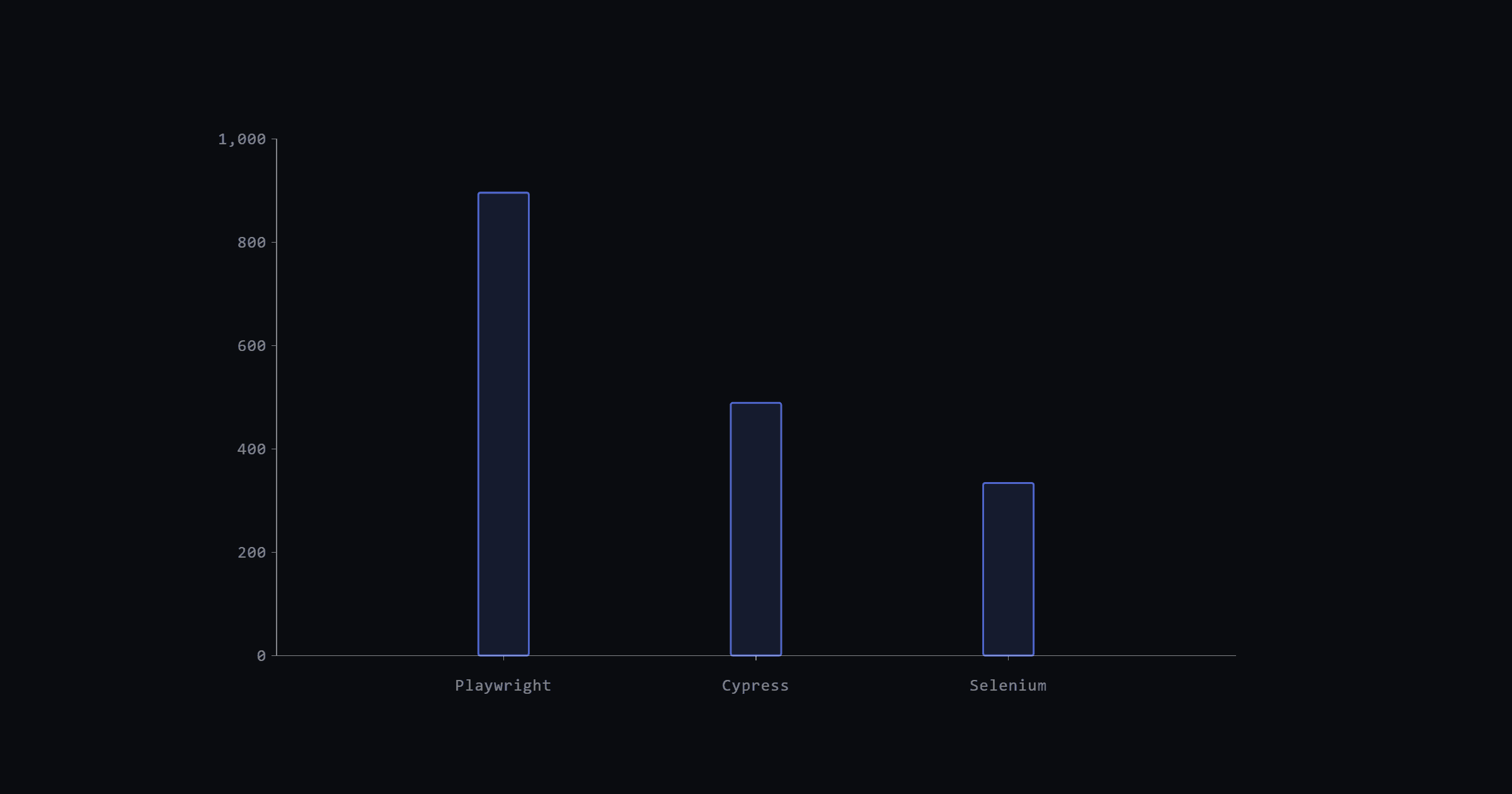
The GitHub star counts tell you where the field sits as of May 2026: Playwright at 90.4k, Cypress at 49.7k, Selenium at 34.2k. The State of JS 2024 survey shows 3,674 respondents using Playwright at work, 3,603 using Cypress, and 1,130 using Selenium. Playwright has pulled roughly even with Cypress in day-to-day usage, after starting from zero in 2020.
This post covers how each tool controls the browser, what each actually does about flakiness, how parallelism works and what it costs, a side-by-side code comparison, Safari support, component testing, AI features, and a framework recommendation by team context.
Versions, adoption, and release cadence as of May 2026
Playwright vs Cypress vs Selenium: at a glance
The first table covers core capabilities; the second covers deployment and ecosystem concerns.
Table 1: Core capabilities
| Criterion | Playwright | Cypress |
|---|---|---|
| Browser control model | Out-of-process CDP/WebSocket | In-browser JavaScript injection |
| Languages | TypeScript, JavaScript, Python, Java, C# | JavaScript / TypeScript only |
| Auto-waiting | Built-in actionability checks + assertion retry | Command queue with built-in retry |
| Parallelism | Native, free, file-level by default | Requires Cypress Cloud (paid) |
| Component testing | Experimental | Stable (React, Angular, Vue 3) |
Table 2: Ecosystem and coverage
| Criterion | Selenium | Notes |
|---|---|---|
| Browser control model | W3C WebDriver protocol | Drives browser natively |
| Languages | Java, Python, C#, Ruby, JavaScript, Kotlin | Widest language support |
| Real Safari (macOS hardware) | Yes | Playwright uses WebKit patch build, not real Safari |
| Parallelism | Via test framework (pytest-xdist, JUnit) | No built-in paid gate |
| Community age | Oldest (2004) | Most legacy content, widest enterprise footprint |
Architecture: how each tool controls the browser
The three frameworks connect to browsers in different ways, and those differences explain most of the trade-offs you'll encounter.
Playwright talks to Chromium and Firefox over Chrome DevTools Protocol (CDP) and a WebSocket connection, running as a separate process. The test process and the browser process are isolated. This means Playwright can open multiple browser contexts, multiple pages, and run tests across them in true parallel within a single suite, without shared state leaking between tests.
Cypress takes a different path. As the docs describe it: "Cypress commands don't do anything at the moment they are invoked, but rather enqueue themselves to be run later." The test code runs inside the browser alongside the application. That in-browser position gives Cypress direct access to the DOM and makes debugging easier (you see the real state in DevTools), but it also produces the framework's permanent trade-offs: "The only language we'll ever support is the language of the web: JavaScript" and "Cypress does not support controlling more than 1 open browser at a time." Multi-tab flows are genuinely not possible.
Selenium uses the W3C WebDriver protocol. A test script sends HTTP commands to a driver binary (chromedriver, geckodriver, safaridriver), which translates them into browser instructions. As the Selenium docs put it: "WebDriver drives a browser natively, as a user would." The architecture is the most standard and the most portable. It's also the reason Selenium requires explicit wait strategies: there's no shared process between the test runner and the browser that could observe DOM state automatically.
Auto-waiting and flakiness: what each framework actually does
Flakiness in E2E tests usually traces back to timing: the test acts on an element before it's ready. Each framework solves this differently, and the approach matters more than any marketing claim about reliability.
Playwright's answer is actionability checks. Before clicking, filling, or otherwise interacting with an element, "Playwright performs a range of actionability checks on the elements before making actions." Those checks include visibility, stability (no ongoing animations), ability to receive events, and whether the element is in the viewport. You don't set a timeout and hope; the framework holds until the element is in the right state, up to a configurable deadline. Assertions written with expect() also retry automatically until they pass or time out.
Cypress handles timing through its command queue. The docs state that "Cypress will automatically block, wait, and retry until it reaches that state." Because commands run inside the browser, Cypress can observe the DOM in real time and retry naturally. The trade-off is that complex asynchronous scenarios (waiting for a network response to update the DOM, then clicking a conditional element) sometimes require explicit cy.intercept() + cy.wait() combinations.
Selenium has no built-in waiting mechanism. You get implicit waits (poll globally until timeout) and explicit waits (write a WebDriverWait with an expected_condition). Implicit waits interact badly with explicit waits, and the Selenium team advises against mixing them. In practice, every Selenium test that touches dynamic content needs explicit wait code. This is verbose but honest: you always know exactly what you're waiting for.
For teams fighting flaky tests already, the fixing flaky tests systematic approach covers isolation patterns that apply regardless of which framework you're using.
Parallelism and CI/CD: running fast at scale
Slow test suites don't get run. Teams route around them, merge without waiting for green, and discover problems in production. How each framework handles parallelism directly affects whether your suite stays useful as it grows.
Playwright's approach is the most straightforward: "By default, test files are run in parallel" with no configuration required. Workers run in separate processes, each with an isolated browser context. You can also shard across CI machines with --shard=1/4, splitting the test files evenly. This is free and works out of the box whether you're on GitHub Actions, GitLab CI, or a local dev machine with multiple cores.
Cypress's parallelism story has a catch. "Running tests in parallel requires the --record flag be passed", which means you need Cypress Cloud, the paid SaaS offering. Cypress Cloud handles orchestration: it distributes spec files across CI machines and feeds results back to a dashboard. If you don't have Cypress Cloud, your options are manual script-level splits or third-party tooling. For small teams this is often fine; at scale it's a real constraint.
Selenium's parallelism is framework-level: pytest-xdist for Python, JUnit's @Parallel annotation for Java, NUnit's Parallelizable for C#. You wire it up yourself, which means more configuration but no vendor dependency. Teams running large Selenium grids often use Selenium Grid (self-hosted) or a cloud provider like BrowserStack or Sauce Labs for machine-level distribution.
For advice on organizing your tests to take advantage of parallelism, the regression testing organization guide for web apps covers the tagging and grouping patterns that make parallel runs practical.
Same test, three frameworks: a side-by-side code comparison
The test: load a login page, fill in credentials, submit, and assert the user lands on the dashboard. Simple enough to compare without noise. One note before the code: each framework's docs recommend a different test-id attribute. Cypress prefers data-cy; Playwright defaults to data-testid via getByTestId(). Both are conventions, not requirements; what matters is picking one and keeping it consistent across your suite.
Playwright (TypeScript, 1.60)
import { test, expect } from '@playwright/test';

test('user can log in successfully', async ({ page }) => {
  await page.goto('/login');

  // fill() runs actionability checks first: visible, stable, enabled, editable
  await page.getByTestId('username').fill('testuser');
  await page.getByTestId('password').fill('secret');
  await page.getByTestId('submit').click();

  // expect() retries until the URL matches or timeout
  await expect(page).toHaveURL('/dashboard');
  await expect(page.getByTestId('welcome-heading')).toBeVisible();
});
The fill() and click() calls wait for actionability before acting. The expect() assertions poll until they pass. No manual wait calls needed for a standard happy path.
Cypress (JavaScript, 15.16)
describe('Login', () => {
  it('user can log in successfully', () => {
    cy.visit('/login');

    // cy.get() retries until the element exists in the DOM
    cy.get('[data-cy="username"]').type('testuser');
    cy.get('[data-cy="password"]').type('secret');
    cy.get('[data-cy="submit"]').click();

    // Cypress retries the URL assertion until it passes
    cy.url().should('include', '/dashboard');
    cy.get('[data-cy="welcome-heading"]').should('be.visible');
  });
});
Cypress's command queue handles the waiting: every cy.get() retries until the element exists. The test reads synchronously even though it runs asynchronously. No async/await syntax needed, which some teams find cleaner.
Selenium (Python, 4.44)
from selenium import webdriver
from selenium.webdriver.common.by import By
from selenium.webdriver.support.ui import WebDriverWait
from selenium.webdriver.support import expected_conditions as EC

def test_user_can_log_in():
    driver = webdriver.Chrome()
    try:
        driver.get("http://localhost:3000/login")

        # Selenium has no auto-wait: explicit wait required
        wait = WebDriverWait(driver, timeout=10)
        username = wait.until(EC.visibility_of_element_located((By.CSS_SELECTOR, '[data-testid="username"]')))
        username.send_keys("testuser")

        driver.find_element(By.CSS_SELECTOR, '[data-testid="password"]').send_keys("secret")
        driver.find_element(By.CSS_SELECTOR, '[data-testid="submit"]').click()

        wait.until(EC.url_contains("/dashboard"))
        wait.until(EC.visibility_of_element_located((By.CSS_SELECTOR, '[data-testid="welcome-heading"]')))
    finally:
        driver.quit()  # runs even when an assertion or wait fails
The Selenium version is longer, and the extra length is all boilerplate: the WebDriverWait setup, the repeated until() calls, and the try/finally that guarantees the browser closes when a wait times out. Every interaction with a dynamic element needs an explicit condition. This isn't optional for reliable tests; it's just the cost of the architecture.
Browser coverage and real Safari: the nuance most posts skip
Most comparisons list "Safari" as a Playwright capability and leave it there. The reality is more specific, and it matters if your requirements include actual Safari on macOS hardware.
Playwright supports "Chromium, WebKit and Firefox on Windows, Linux and macOS." The WebKit browser Playwright uses is not the Safari you download from Apple. The docs are explicit about this: "Playwright doesn't work with the branded version of Safari since it relies on patches." Playwright's WebKit is a custom build with patches for automation support. It covers a large portion of Safari-specific behavior, but it's not identical to what your users run on iOS or macOS.
Cypress currently supports Firefox and Chrome-family browsers (including Edge and Electron) with "experimental support for WebKit." WebKit support in Cypress carries the same caveat: it's the patched build, not real Safari.
Selenium with safaridriver, running on a macOS machine, drives real Safari. If your QA requirements say "test on the exact Safari version your users run," Selenium is the only one of these three that delivers that without a separate device farm setup.
For most web apps, Playwright's WebKit is close enough. For financial services, healthcare, or any context where Safari behavior on Apple hardware is a compliance requirement, Selenium plus safaridriver (or a cloud provider that exposes real Safari) is worth the verbosity cost.
Component testing: Cypress's edge over the other two
Component testing mounts a single UI component in isolation: no full browser navigation, no backend, just the component and its props. It's faster than E2E testing and catches rendering bugs that unit tests miss because it uses a real browser renderer.
Cypress component testing is stable, supporting React 18-19, Angular, Vue 3, with Svelte in alpha. You mount a component with cy.mount(), interact with it, and assert on the rendered output. The tooling is mature enough for production use, and the Cypress UI shows you the actual rendered component while the test runs, which makes debugging straightforward.
Playwright's component testing is experimental. It works, and teams use it, but it doesn't carry Playwright's stability guarantees yet. The API may change between minor versions.
Selenium has no component testing story. It drives full pages through a browser, which means setting up a running application is a prerequisite for every test.
If component testing is a significant part of your strategy (particularly for React or Vue apps with complex interactive components), Cypress has a real advantage here. Playwright might close this gap once its component testing graduates from experimental, but today it's Cypress's clearest edge.
AI-assisted testing: what's shipping now vs what's experimental
All three ecosystems have shipped or are shipping AI-assisted test tooling. The maturity levels differ a lot, and it's worth being precise about what's actually usable.
Playwright's AI work is the most architecturally interesting. Playwright Test Agents introduces three roles: planner, generator, and healer. The most practically useful today is the healer, which "executes the test suite and automatically repairs failing tests." If a locator breaks because a class name changed, the healer rewrites the selector. You initialize it with npx playwright init-agents --loop=claude (loops for VS Code and opencode are also available). This is a real reduction in maintenance overhead for teams with selector-heavy test suites.
Cypress's AI feature is cy.prompt(), introduced in 15.4.0 and currently in beta as of 15.13.0. It "uses AI to convert natural language test steps into executable Cypress tests," requires Cypress Cloud, works only in E2E mode (not component), and is "free to use during the beta period." The beta status means the API could change. It's worth trying if you're on Cypress Cloud already, but don't build your workflow around it yet.
Selenium has no native AI features. Any AI-assisted test generation for Selenium happens at the IDE or external tooling layer (Copilot, Cursor, browser recording tools), not inside the framework itself.
The honest note for all three: AI generation handles selector maintenance and boilerplate reasonably well. It doesn't handle test design. Writing a test that actually catches a real regression requires understanding what the application does, what can break, and what constitutes correct behavior. No tool generates that judgment.
Pick one: framework recommendations by team context
Choose Playwright when you're starting a new project, your team can use TypeScript or Python, and you want the lowest maintenance overhead over time. The native parallelism, automatic actionability checks, and multi-browser support from one install make it the lowest-friction option for most greenfield E2E suites. The trace viewer is also the best debugging tool in the category.
Choose Cypress when your team is exclusively JavaScript, you want component testing to be stable and integrated with your E2E suite, or you need the visual debugging workflow that the in-browser runner provides. Cypress also works well for teams that don't need parallelism beyond a single machine: the command queue and automatic retry are mature, and the Cypress UI makes it easy to demo test runs to non-engineers. Budget for Cypress Cloud if you expect the suite to grow past what a single CI machine can handle.
Choose Selenium when you need real Safari on macOS hardware, when your team writes tests in Java, C#, Ruby, or Kotlin, or when you're inheriting an existing Selenium suite that's working adequately. The cross-language support and the W3C WebDriver standard mean Selenium integrates everywhere, including enterprise environments where JavaScript tooling isn't standard. The explicit wait boilerplate is a real cost, but teams that already know the patterns don't find it prohibitive. Selenium Manager (Beta) now "provides automated driver and browser management," removing the most common setup complaint.
Don't try to run all three. Pick one and maintain it. The switching cost between frameworks is real (all your locators, helpers, and CI configuration change), and a mixed-framework suite is harder to reason about than a single consistent one.
Frequently asked questions
Is Playwright faster than Selenium?
In practice, yes for most suites, but the reason is parallelism by default rather than raw execution speed. Playwright runs test files in parallel out of the box with no configuration. Selenium achieves the same throughput but requires you to configure parallelism yourself via your test framework (pytest-xdist, JUnit, etc.). Single-threaded, the two are comparable.
Can Cypress test multiple browser tabs?
No. This is a documented permanent limitation. "Cypress does not support controlling more than 1 open browser at a time." Flows that require opening a new tab (OAuth redirects, pop-up confirmations) need workarounds like stubbing the window.open call or directly visiting the second URL in the same tab.
Does Playwright support real Safari?
Not exactly. Playwright uses a patched WebKit build, not the Safari browser from Apple. The official docs state: "Playwright doesn't work with the branded version of Safari since it relies on patches." For most web testing purposes, the patched WebKit is sufficient. For compliance scenarios requiring real Safari on macOS hardware, use Selenium with safaridriver.
Is Selenium still worth learning in 2026?
Yes, with conditions. Selenium's multi-language support and W3C WebDriver standard give it a foothold in enterprise environments and existing codebases that Playwright and Cypress don't have. The 1,130 "used at work" respondents in the State of JS 2024 survey represent teams maintaining real production suites. For new projects with no constraints, Playwright is the better starting point.
Are Playwright Test Agents and Cypress cy.prompt() production-ready?
Not fully. Playwright's healer agent is the most mature of the AI features and useful for selector maintenance. Cypress cy.prompt() is in beta as of 15.13.0, requires Cypress Cloud, and is limited to E2E mode. Both are worth experimenting with, but treat them as supplements to a test strategy you design yourself, not replacements for it.
What comes next: Test Agents, WebDriver BiDi, and AI generation
Playwright's Test Agents are the most active development direction. The healer role is shipping now; the planner and generator roles are maturing. As selector maintenance becomes automated, teams will spend less time on the mechanical parts of test upkeep and more time on test design.
Cypress's cy.prompt() beta has a clear path toward GA once the cloud infrastructure scales to handle demand. Component testing for Svelte is moving from alpha toward stable, which would make Cypress competitive across the major frontend frameworks.
Selenium's long-term foundation is WebDriver BiDi, the W3C bidirectional protocol that replaces the old HTTP command model with a persistent WebSocket connection. BiDi brings Selenium closer to the event-driven architecture that Playwright has used from the start, including real-time event subscriptions and faster interactions. This is a multi-year effort, but it means Selenium is building toward a modern protocol foundation rather than maintaining a legacy one.
AI generation of test code will keep improving across all three. What won't change is the need for engineers who understand what makes a test meaningful: what behavior to cover, what edge cases matter, what assertions prove correctness rather than just confirming the happy path ran. The frameworks can write selector code; they can't write judgment.
Getting started with your chosen framework
Install and run your first test:
Related reading on Testland: